

Event Marketers: 4 Phase YouTube Ads Strategy to Prove Ticket Sales

The single most effective approach for YouTube ads for events is a sequenced campaign: national awareness first, then consideration content, then remarketing, then a live-day budget surge, all layered over tightening geographic radius. Run in‑stream and Shorts creative built on a Hook → Educate → CTA structure, and treat conversion tracking as the backbone, not an afterthought. Before writing a single script, link your YouTube channel to Google Ads and install conversion tags. That single step determines whether the rest of the campaign can even be measured.
TL;DR:
Building warm remarketing audiences early is essential for cheaper conversions, and linking your YouTube channel to Google Ads helps automatic list population.
Using a sequenced four-phase approach with targeted creative and geographic tightening maximizes engagement and conversion rates as the event date approaches.
The most effective ad formats are skippable in‑stream and Shorts, both requiring compelling seven-second hooks that highlight key event details immediately.
Conversion tracking must be set up before the campaign begins, with tags installed on the ticketing confirmation page to enable reliable measurement of ticket sales.
Combining YouTube ads with email and creator partnerships amplifies reach and performance, providing more cost-effective results than standalone campaigns.
Table of Contents
The Four-Phase Framework for YouTube Ads for Events
Think of your event campaign the way a theater director thinks about a season. You don’t open with the finale, and you don’t build hype for a show nobody knows exists yet. The same logic applies to advertising events on YouTube: each phase has a job, a budget weight, and a creative type that matches it.
Phase 1: Awareness (8 to 12 weeks out). Objective is reach, not clicks. Run in‑stream skippable ads and bumpers against broad Affinity and topic targeting.
Phase 2: Consideration (4 to 8 weeks out). Objective shifts to engagement and site visits. Introduce Discovery ads and longer-form trailers that show schedule details, artist lineups, or exhibition previews. Budget weight: around 25%.
Phase 3: Retargeting (2 to 4 weeks out). Objective is conversions. Pull in everyone who watched 25% or more of your Phase 1 and 2 creative, plus site visitors, and hit them with urgency-driven bumpers and Shorts. Budget weight: roughly 20%.
Phase 4: Live-day scaling (final 72 hours through event day). Objective is last-chance conversions and, for hybrid or streamed events, live viewership. Strike Social’s case study on live-broadcast campaigns found this sequenced approach can produce live-day click-through rates around 4 to 5%, well above typical in-stream benchmarks, alongside meaningful cost-per-click savings.
Awareness creative feeds the audience pool for consideration.
Consideration viewers become the retargeting list.
Retargeting non-converters get the final live-day push.
Each phase’s video assets double as the next phase’s audience source.
This isn’t four disconnected campaigns. It’s one continuous funnel where yesterday’s viewer becomes today’s target.
How Do You Build the Right Audiences for Event Ads?
Warm audiences convert cheaper than cold ones, every time, so build them first. Upload your event trailer to YouTube, then create remarketing lists from anyone who watched it, visited your ticketing page, or opened a recent email blast. Ticket Fairy’s guide to YouTube ads for events recommends linking your channel to Google Ads specifically so these warm pools populate automatically as your organic content gets views.
Once warm lists exist, layer cold targeting around them:
Affinity audiences for broad interest categories (theater lovers, live music fans, museum enthusiasts) during Phase 1.
In‑Market audiences for people actively researching events, tickets, or venues during Phase 2 and 3.
Topic and keyword targeting on content related to your genre, artist, or exhibition subject.
Creator and channel placements where your likely attendee already watches. A local arts blog’s YouTube channel often outperforms a generic entertainment channel.
Test small before scaling. A cold Affinity audience under 500,000 people can burn through budget fast without proving anything; an audience over 5 million is often too diffuse for a single-city event. Run each cold segment for three to five days at a modest daily budget before deciding whether it earns a bigger share of Phase 1 spend.
Pro Tip: Build your remarketing lists the week you launch Phase 1, even if you don’t plan to use them until Phase 3. YouTube needs time to accumulate list size, and a list that’s too small on launch day simply won’t serve.
Which Ad Formats and Scripts Actually Sell Tickets?
Format choice should follow objective, not preference. Here’s the practical mapping:
Skippable in‑stream ads for Phase 1 and 2 awareness and consideration, run at 15 to 30 seconds, since viewers who choose to keep watching are self-selecting as interested.
Bumper ads (6 seconds, non-skippable) for frequency and reminder messaging in Phase 3 and 4, when the goal is repetition, not persuasion.
Discovery/Feed placements for consideration-phase viewers actively browsing, using thumbnail and title pairs that highlight lineup or schedule.
YouTube Shorts across every phase for social proof, behind-the-scenes footage, and urgency countdowns, since Shorts inventory tends to be cheaper and faster to produce.
Every format shares the same script backbone: Hook, Educate, CTA. The first seven seconds carry almost the entire burden. Lose the viewer there and the rest of the ad, however good, plays to nobody. Open with the most visually striking moment of your event, not your logo. Then educate: date, location, one differentiator (headliner, exhibit exclusivity, limited run). Close with a direct CTA and on-screen ticket link.
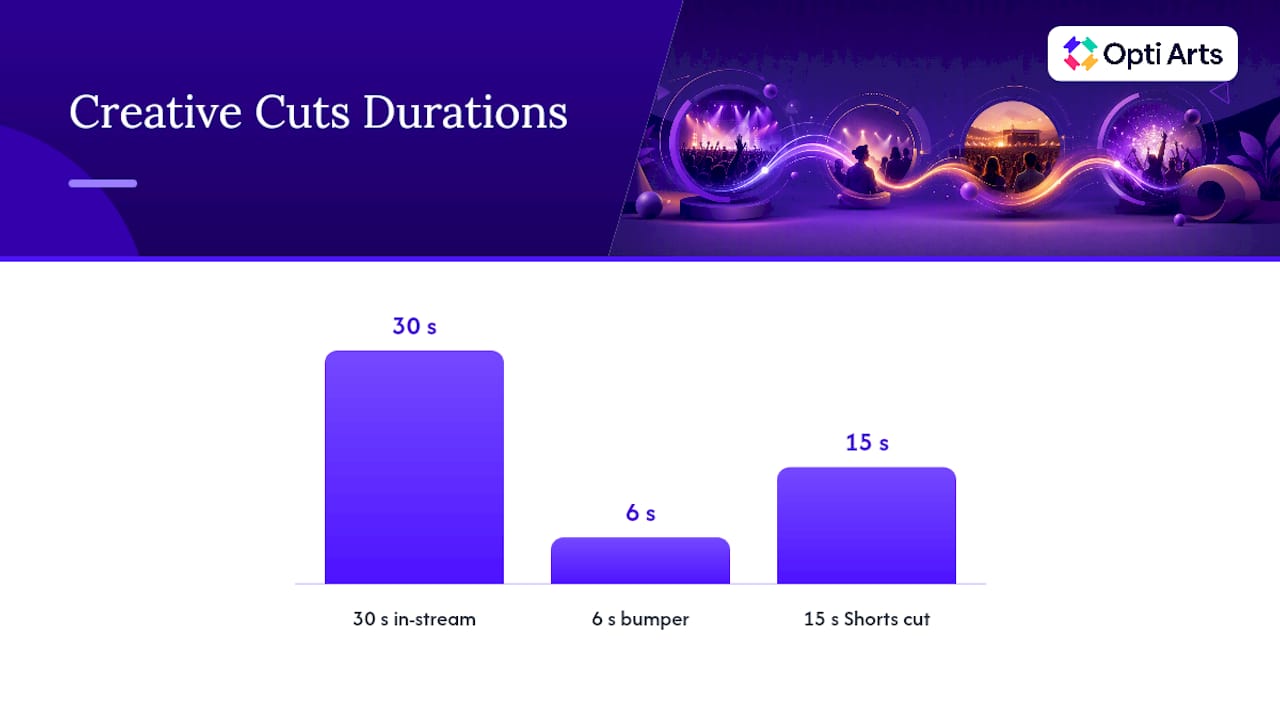
Pro Tip: Cut your longest trailer into three assets before you launch: a 30-second in‑stream version, a 6-second bumper using only the strongest visual beat, and a 15-second Shorts cut with captions burned in. One shoot day, three phases covered.
Tools like AmmarAI’s video generator can help stretch a single script into these shorter formats quickly if your team is producing creative in-house without a full edit bay.
Budget and Geographic Timing That Prevents Overspend
Geography should tighten as the event gets closer, mirroring your creative funnel. Start regional or national in Phase 1 to build reach cheaply, then narrow to your metro area by Phase 2, and finally to a 25 to 50 mile radius around the venue for Phase 3 and 4. A geofenced campaign case study around a theater showed that tightening the radius as the date approached produced stronger engagement at a lower cost per impression than staying broad the entire run.
Phase 1: national or regional, broad Affinity targeting, roughly 40% of budget.
Phase 2: metro-wide, In‑Market and topic targeting, roughly 25% of budget.
Phase 3: city radius, remarketing lists, roughly 20% of budget.
Phase 4: tight radius plus all warm lists, roughly 15% of budget, spent over 72 hours.
Raise bids for Phase 4 two to three days out, not two to three weeks out. Bidding up too early just inflates your Phase 2 and 3 costs without moving tickets that weren’t ready to buy yet. Cap frequency at three to four impressions per user per week during awareness to avoid burning budget on fatigue, then loosen that cap in Phase 4 when repetition actually helps close the sale.
What Should You Track to Prove Ticket Sales?
Set this up before Phase 1 launches, not after Phase 3 underperforms and you’re troubleshooting blind.
Install a Google Ads conversion tag on your ticketing confirmation page, tracking purchase and registration as primary events.
Add secondary events for add-to-cart and view-item actions on your ticketing site, so you can see where drop-off happens.
Connect GA4 to the same site and cross-check conversion counts against Google Ads; discrepancies over 10 to 15% usually mean a tagging error.
Turn on Enhanced Conversions or move to server-side tracking if your ticketing platform sits behind a checkout redirect, since privacy changes have made client-side pixels less reliable.
Run a test purchase before launch to confirm the tag fires and the value passes through correctly.
Ticket Fairy’s event promotion guide flags installing conversion tags before launch as one of the most commonly skipped steps, and it’s the one that makes every optimization decision downstream either reliable or worthless.
Watch view-through conversions closely in Phase 1 and 2, since awareness ads rarely get clicked but often precede a direct visit days later. By Phase 4, shift your primary KPI to same-day conversions and, for hybrid events, live concurrent viewers.
Combining YouTube With Email and Creator Momentum
YouTube ads for events rarely work as a standalone channel. They work as an amplifier. Time your Phase 1 launch to coincide with your first email announcement, and use creator or partner content to seed organic views your ad budget can then remarket against. Google’s own Brandcast guidance points to combining creator partnerships with paid reach as a way to build both brand and performance simultaneously.
Sync email send dates with Phase 2 launches so retargeting lists have fresh signal.
Retarget anyone who clicked an email link or watched creator content with Phase 3 bumpers.
Offer affiliate or promo codes to partner venues and creators to track direct-attribution lift.
Expect combined channels to outperform YouTube-only spend on cost per acquisition, though the exact lift varies by event size and list quality.
What Opti Arts Has Learned Running Campaigns for Cultural Venues
Opti Arts builds these phase-by-phase campaigns specifically for museums, theaters, and performing arts venues, pairing YouTube with Meta, Streaming TV, and Spotify so no single channel carries the whole load. The Breakeven dashboard ties ticket sales back to the exact campaign and phase that drove them.
The checklist commonly used in similar campaigns includes:
Warm audiences built and tagged before creative launches
Conversion tracking tested and validated, not assumed
Geographic radius scheduled to tighten automatically by phase
Post-event data pulled within 48 hours to inform the next campaign
Where to Focus If You’re Short on Budget
If you can only do three things, do this: build your remarketing list early, get conversion tracking working before you spend a dollar, and put your best creative in the first seven seconds. Skip the fourth phase’s aggressive bidding if your Phase 1 and 2 audience never reached meaningful size. A quick win you can execute today: cut one Shorts asset from existing footage and launch it against your warmest list by tomorrow morning.
— Trevor
Get Hands-On Help Running Your Event Campaign
Building a four-phase YouTube campaign on top of Meta, Streaming TV, and Spotify takes more coordination than most in-house marketing teams have bandwidth for, especially in the weeks before curtain-up. Opti Arts runs these campaigns specifically for museums, theaters, and performing arts organizations, handling creative sequencing, audience layering, and conversion tracking so your team isn’t rebuilding this playbook from scratch every season.

A first call with Opti Arts typically covers your event calendar, current ticketing setup, and where past campaigns lost signal, whether that’s a missing conversion tag or a creative library that never got repurposed into Shorts. From there, we scope a phase-by-phase media plan across the channels that make sense for your venue. If you already run campaigns and just need reliable attribution, Breakeven connects directly to your ticketing system and shows which phase, creative, and channel actually drove the sale. Visit Opti Arts’ solutions page to request a walkthrough before your next event goes on sale.
Sources
FAQ
Is $20 a Day Enough Budget for Event YouTube Ads?
$20 a day can sustain a narrow retargeting audience in Phase 3 or 4, but it’s too thin for Phase 1 awareness against a broad Affinity audience in most markets. Scale daily spend up as your geographic radius tightens and your audience gets warmer.
What Is the Seven-Second Rule on YouTube?
The seven-second rule refers to how little time you have before a viewer decides whether to keep watching or skip. Your strongest visual and message need to land in that opening window, not after a logo or slow build-up.
What’s the Best Way to Advertise an Event Overall?
A combination strategy works best: sequenced YouTube phases paired with email and creator amplification, backed by verified conversion tracking. No single channel reliably outperforms a coordinated multi-channel push for ticket sales.
How Many Views Do I Need Before an Event Campaign Pays Off?
There’s no fixed view count that guarantees payoff, since it depends on your conversion rate and ticket price, not raw reach. Track cost per conversion by phase instead of chasing a view target, and let that number tell you when the campaign is working.
Should I Use Video Action Campaigns or Manual Campaign Setup?
Video action campaigns automate bidding and placement across formats, which suits teams without dedicated ad management time, while manual setup gives more control over sequencing between phases. Most event marketers get better phase transitions from manual or semi-manual setup, then let automation optimize within each phase.
Recommended